Frequency & devices
Limit how often a popup shows and on which devices, for which visitors.
Nobody likes a popup that opens on every page. Frequency limits how often a popup may open for the same visitor, and the device and visitor settings choose who can see it at all: desktop, tablet or phone, logged-in members or anonymous visitors.
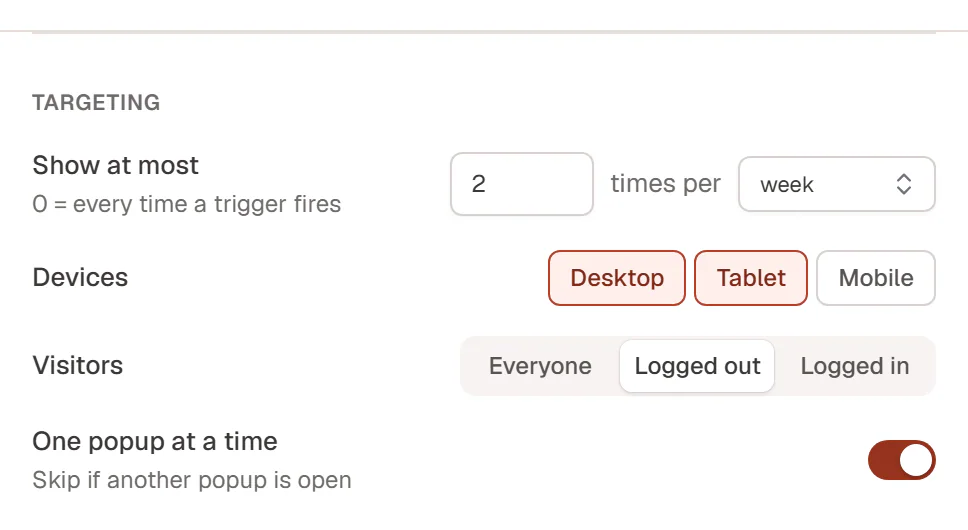
These settings are in the Targeting group of the Theme Builder's Popup settings drawer, and under Show it in the editor's Popup tab.
Limit how often it opens
Show at most sets how many times the popup may open for one visitor, and times per sets the period:
| Period | Counts |
|---|---|
| visit | Per visit (until the visitor closes the browser tab or window). |
| day / week / month | In the last 24 hours, 7 days or 30 days. |
| visitor, ever | In total, for good. |
Set Show at most to 0 to open the popup every time a trigger fires. New popups open at most once a day.
The count is kept in the visitor's browser. Clearing browser data, another browser or another device starts from zero, and a private window always starts from zero, which is handy for testing.
In the editor these settings read Times and Per (Visit, Day, Week, Month, Ever).
Choose devices
Devices (On devices in the editor) turns the popup on for Desktop, Tablet and Mobile. The device is decided by the width of the browser window, with the same breakpoints as the editor's device views. When no device is selected, the popup never shows.
On a device that is turned off, the popup does not open at all, not even from a link.
Choose visitors
Visitors (To in the editor) shows the popup to Everyone, only to Logged out visitors, or only to Logged in visitors. A signup popup, for example, makes sense for logged-out visitors only.
One popup at a time
One popup at a time (Not while another popup is open in the editor) skips an automatic opening while another popup is already open, so two popups never stack. It is on by default.
Links and buttons that open a popup ignore the frequency limit and One popup at a time.