Element manager
See where each widget is used and turn off the ones you do not need, to keep the Insert panel short.
On this page
Urmi comes with 80 widgets. Most sites use a handful. The Element manager shows how often each widget is used on your site and lets you turn off the ones you do not need, so the editor's Insert panel only lists what you and your team actually use.
Go to Urmi → Settings → Elements.
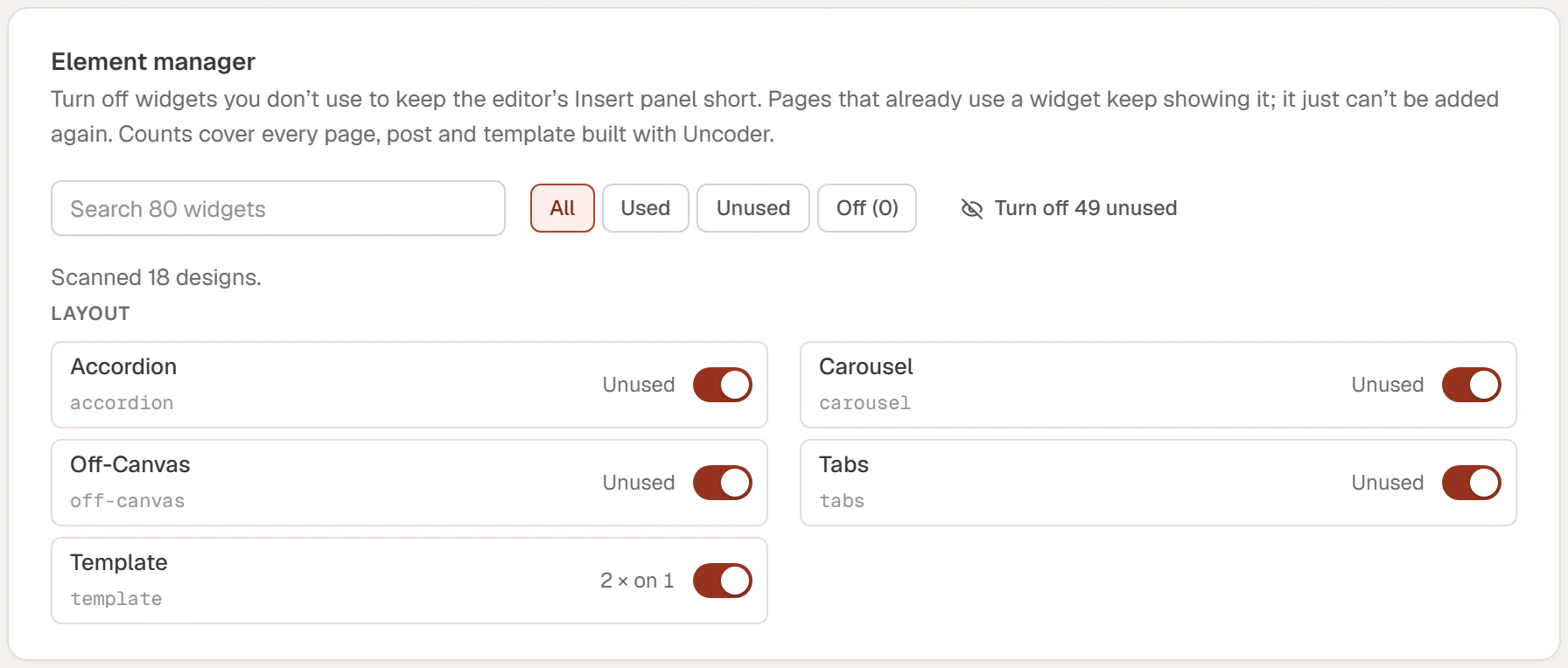
Read the list
Widgets are grouped like in the Insert panel: Layout, Basic, Media, Marketing, Content, Forms, and Site & theme. For each widget you see:
- its name and its technical name below it
- how often it is used: for example 27 × on 14 means 27 times on 14 designs, or Unused
- a switch to turn it on or off
The counts cover every page, post and template built with Urmi. The line Scanned … designs above the list says how many were checked.
Use the search field (Search 80 widgets) to find a widget by name, and the filters to narrow the list:
| Filter | Shows |
|---|---|
| All | Every widget. |
| Used | Widgets used at least once. |
| Unused | Widgets not used anywhere. |
| Off (n) | Widgets you turned off. The number counts them. |
Turn widgets off
- Turn off a single widget with its switch.
- Click Turn off … unused (the button shows the number) to turn off every widget that is not used anywhere, in one go.
- Click Turn all on to bring every widget back.
Then click Save changes in the bar at the bottom of the screen.
A widget you turn off disappears from the editor's Insert panel and widget search, so nobody adds it by accident. Pages that already use it keep showing it, on the site and in the editor. It just cannot be added again until you turn it back on.
Turning widgets off keeps the editor tidy for clients and editors. It does not make the site faster for visitors: Urmi already loads the styles and scripts of a widget only on pages that use it. See Performance.