Roles & access
Decide which WordPress roles can use the builder and how much they may change.
On this page
By default, everyone who can edit a page in WordPress can also edit it with Urmi. With the Roles setting you can limit that per role: give your content team Content only, so they can update texts and images without changing the design, or keep a role out of the builder completely.
Go to Urmi → Settings → Access & roles and scroll to the Roles card.
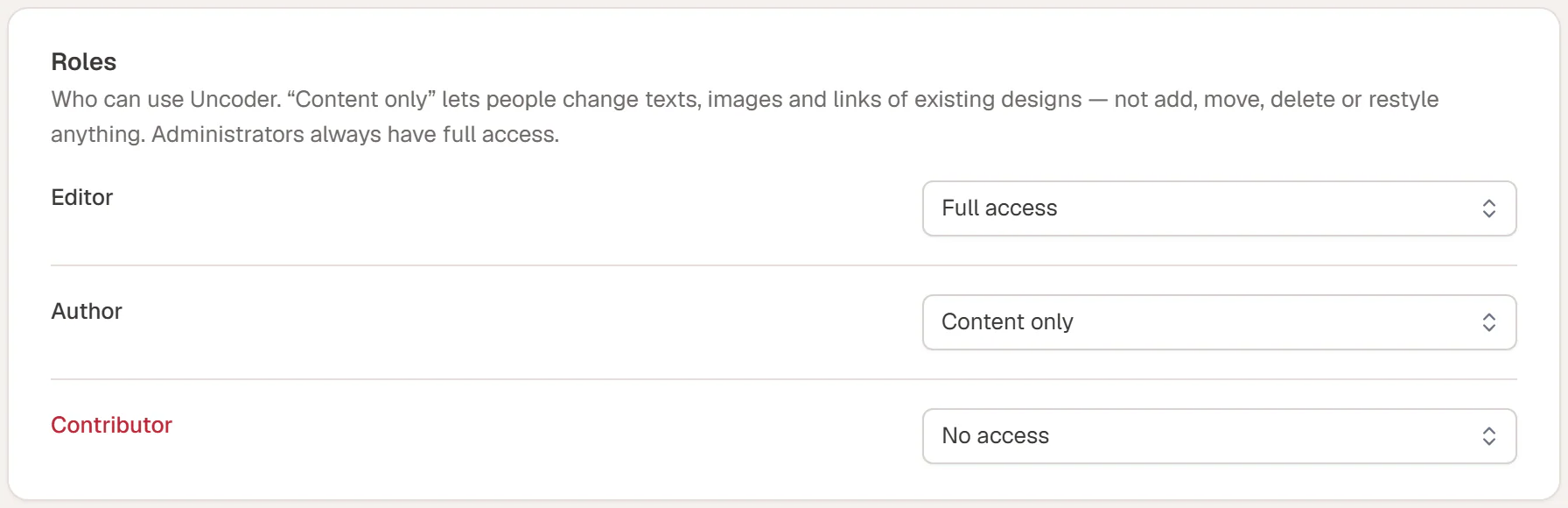
Access levels
Each role that can edit content in WordPress has a menu with three levels:
| Level | What people with this role can do |
|---|---|
| Full access | Everything their WordPress role allows: add, move, style and delete elements, change page settings, use all inspector tabs. This is the default. |
| Content only | Change the texts, images and links of existing designs, on the Content tab of the inspector. They cannot add, move, delete, hide or restyle anything. |
| No access | No Edit with Urmi link and no access to the builder. Pages built with Urmi still show normally on the site. |
Administrators always have full access, so they are not listed.
Click Save changes in the bar at the bottom of the screen to apply your choice.
How Content only works
For a person with Content only:
- The inspector shows only the Content tab. Design and Behaviour are hidden.
- They cannot insert widgets or sections, drag elements, duplicate or delete them.
- Urmi also checks every save on the server. If a save changes more than content (for example because of a browser extension or a copied request), it is refused with a message like "Your role can edit content only: elements cannot be added, removed or moved."
- AI tools that change pages are not available to them. They can still use AI writing on text fields, and a connected AI assistant can only read for them.
Use Content only for clients or colleagues who keep texts and photos up to date while the design stays as you built it.
People with several roles
If a user has more than one role, the most generous level wins. A user who is both an Author (Content only) and an Editor (Full access) gets full access.
WordPress permissions still apply
The levels only ever reduce what a role can do. They never add rights: an Author with Full access still cannot edit other people's pages if WordPress does not allow it, and only roles that may change the theme can edit Theme Builder templates and the Design System.
Related
- Maintenance & coming soon, in the same section
- Server settings: which roles may connect AI apps
- The inspector